Drivvo - Car Expense Tracker
- 4.4
- Rating
- 5.00M
- Installs
- Free
- Price
 Analysis by App-foxy
Managing a car, motorcycle, van, or work vehicle often becomes a collection of scattered notes, fuel receipts, service reminders, and half-remembered mileage figures. I tested Drivvo as a way to bring those details together, and I found its main value in making routine vehicle costs easier to see over time. It is an Auto & Vehicles app from Drivvo, available for free, with optional in-app purchases ranging from $2.00 to $400.00 per item.
The app is designed for more than one type of vehicle or piece of equipment, so it can suit someone with a personal car as well as a household managing several vehicles. It has been available since June 24, 2012, and its current version is 9.1.1. With an Everyone age rating and support for Android 6.0 or later, it is approachable for a broad range of users. The important question, though, is not simply whether it stores information. It is whether entering that information feels manageable in real life, especially for people with different reading, movement, attention, or sensory needs.
How clearly Drivvo presents vehicle information
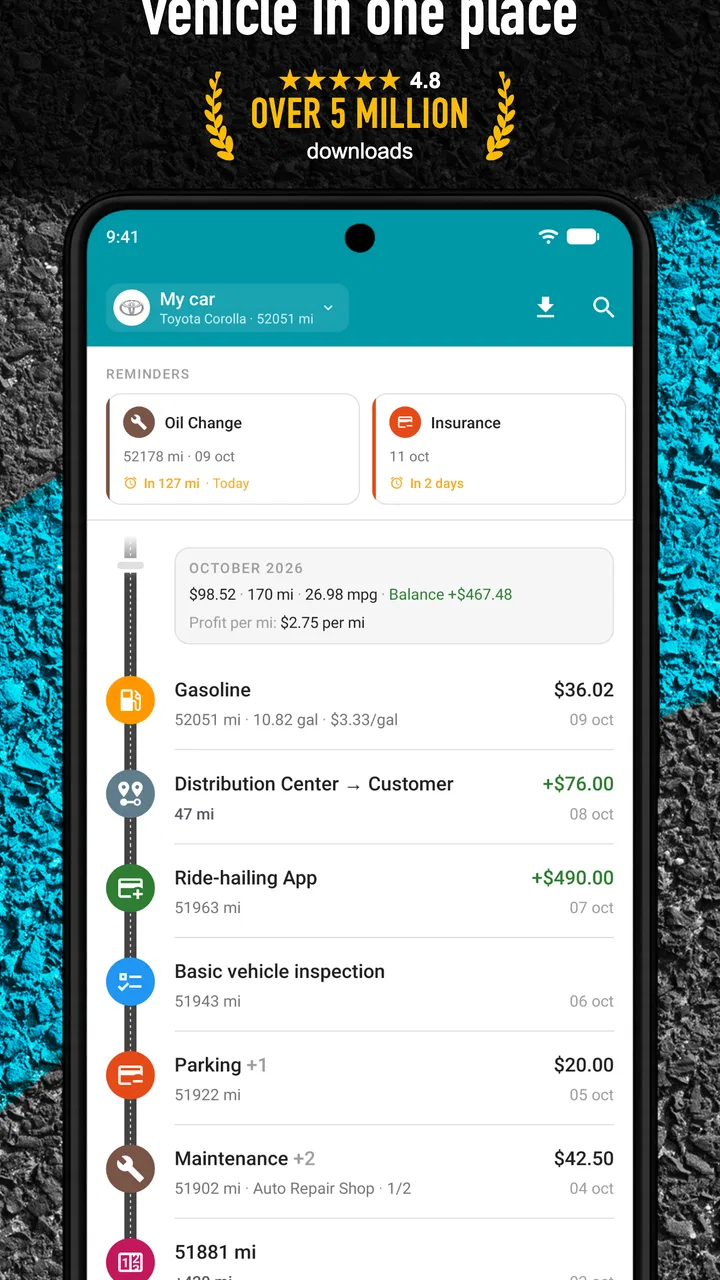
My first impression was that Drivvo makes more sense when treated as a running log rather than as a one-time setup tool. You add a vehicle, then record the events that matter: fuel, maintenance, expenses, and related use. That structure is familiar enough that I did not need to learn a complicated system before making a useful entry.
You May Also Like

 Blood Strike: 2.5 Anniversary
Blood Strike’s Loadouts Turn Every Drop Into a Tactical Gamble
A close look at Blood Strike’s custom loadouts: how fast access to signature weapons reshapes its battle royale rhythm, rewards preparation, and narrows the gap between fights.

 Pandora - Music & Podcasts
Pandora’s Music Is Easy to Start, but Harder to Recover
Pandora’s strength is its low-effort path from a seed to a station. Its weak spot is how much confidence it asks you to place in connection, setup, and quiet recovery.

 8 Ball Pool
 Is Built on Rivalries, Rematches, and Routine
A close look at the rivalries, rematches, shared routines, and unanswered safety questions that turn a quick pool match into a persistent mobile community.

 Samsung Music
’s Quiet Strength Is Playing What You Already Own
Its reach comes less from spectacle than from dependable access to a personal library. That simplicity is both the app’s strongest retention engine and its ceiling.

 AccuWeather: Weather Radar
AccuWeather Review: A Quick, Clear Forecast for Everyday Decisions
For everyday plans, the best forecast is the one you can understand quickly. AccuWeather makes rain timing, radar, and local conditions easy to act on, with a few trade-offs.

 Hill Climb Racing
Why Hill Climb Racing Still Turns Crashes Into One More Run
A tiny car, a bumpy hill and one more upgrade: Hill Climb Racing keeps resurfacing because its simple chaos makes every near-miss feel personal.
More From Our News Desk
View All News


The strongest part of this approach is the separation between individual records and the broader picture. A fuel entry is not just a receipt copied into a phone; it becomes part of a history that can help you understand spending and consumption. Maintenance entries similarly become a reference point when you are trying to remember what was done and when. The real benefit appears after consistent use, not after the first entry.
For readability, I recommend setting up only the information you genuinely intend to maintain. It is tempting to add every possible detail immediately, but a smaller, reliable log is more useful than a complete-looking record that you stop updating. Someone who finds dense screens tiring may benefit from entering one category at a time, such as fuel first, then adding service records later.
Navigation is most comfortable when I approach the app with a specific task in mind. “Record today’s fuel” is easier than opening the app and trying to interpret every available option. That habit also reduces the number of decisions required on a busy day. If you are helping a family member use it, a short routine—open the vehicle, choose the expense type, enter the amount and mileage, save—can make the process less intimidating.
The app’s long history and large user base suggest that it has had time to mature as a vehicle-management tool. It holds an average rating of 4.5 from around 112 thousand ratings, and it has passed 1 million installs. Those figures do not guarantee that every screen will suit every person, but they do indicate that Drivvo is not an obscure experiment with no established audience.
Reading patterns instead of chasing perfect records
One useful mindset is to use the app for trends rather than treating every number as a formal accounting statement. If you record fuel in a consistent way, you can notice whether a vehicle is becoming more expensive to run. If you record repairs as they happen, you can better understand the difference between ordinary upkeep and an unusually costly period.
This matters for users who find long forms or repeated data entry difficult. You do not have to make every record equally detailed to gain value. A simple, repeatable entry can answer practical questions later: how often am I filling up, what did this service cost, and which vehicle is consuming the most money? The trade-off is that incomplete records produce an incomplete picture, so consistency matters more than perfection.
I also found that the app is better suited to deliberate review than to hurried interpretation while driving. Entering information after parking is safer and less stressful. If small text, visual clutter, or multiple fields slow you down, preparing a routine before you leave can prevent the app from becoming another distraction at the fuel station or workshop.
Using Drivvo with different abilities and routines
I find that the most important accessibility question is not whether someone can open Drivvo, but whether its repeated record-keeping fits their hands, vision, attention, and daily routine. A useful way to lower the burden is to decide in advance which details matter for each entry and keep the habit small enough to sustain. That makes it easier to judge whether the app’s structured log is genuinely helpful for you.
Motor considerations and the cost of repeated entry
Vehicle tracking sounds simple until you consider how often the same actions must be repeated. A user with limited finger movement, hand fatigue, tremors, or difficulty with precise taps may find that repeated form entry is the biggest barrier. The challenge is not understanding what a fuel or maintenance record means; it is completing several small interactions accurately.
For that reason, I would use Drivvo in short sessions and avoid trying to reconstruct months of history in one sitting. Start with current information, then add older records only when they are easy to verify. This reduces fatigue and lowers the chance of entering a misleading number simply because the process has become frustrating.
A practical workflow is to keep the receipt or service invoice available, enter the record while the details are still visible, and stop after the essential fields are complete. If you use several vehicles, give each one a clear identity in your own routine so you do not accidentally attach a repair to the wrong vehicle. The app’s multi-vehicle purpose is useful here, but it also increases the importance of checking which vehicle is active before saving.
People who rely on one-handed phone use may prefer to hold the device securely and enter records later rather than attempting the task beside a pump. Someone assisting another user can also take over the data-entry step while the vehicle owner supplies the information verbally. That is a simple but effective way to preserve the record without making the phone interface the center of the task.
Sensory load, attention, and confidence
For users with visual processing differences, attention difficulties, or sensitivity to busy interfaces, the most helpful strategy is to treat Drivvo as a focused tool with a narrow purpose. Open it when you know what you want to record, complete that action, and leave the broader analysis for a calmer moment. This is more comfortable than browsing every section during a rushed errand.
Users with reduced vision should check whether the text and controls are comfortable on their particular phone and display settings. I would not assume that a generally familiar interface automatically provides ideal readability for every person. Increasing the system’s text size or display scaling may help, but it can also change how much information fits on a screen, so the result should be tested before relying on it.
For users with hearing loss, the app’s core purpose is naturally less dependent on spoken interaction than a voice-led service would be. The records are primarily visual and task-based. That can make it a reasonable option for someone who prefers not to rely on audio prompts. At the same time, anyone who needs strong audio or haptic confirmation should test the saving process personally rather than assuming every important state change will be communicated in the preferred way.
Color perception is another consideration when reading expense or performance summaries. I recommend paying attention to labels, values, and context rather than relying on color alone. If a chart or visual distinction is hard to interpret, the underlying figures and written categories are more dependable than a quick glance at color differences.
Situational access in everyday vehicle ownership
The most realistic use case is a normal refueling stop. I would park, take a photo or keep the receipt, and enter the information only after moving away from the pump. That small change makes the experience safer, gives me time to check the mileage, and avoids trying to operate a phone while handling fuel. Drivvo is useful in this situation because the value of the record continues after the stop; it can contribute to a longer history of running costs.
Another good scenario is preparing for a service appointment. Before visiting a mechanic, I can review past maintenance and expenses instead of searching through paper receipts or messages. This does not replace a mechanic’s inspection, but it gives me a clearer account of what I remember paying for and which work has already been recorded. For someone with memory difficulties, that history can reduce the pressure of recalling details on the spot.
Families can use the app as a shared vehicle log, although the quality of the result depends on everyone following the same convention. Decide in advance whether fuel entries will use the receipt total, whether mileage will always be recorded, and how repairs will be named. Without that agreement, several people may enter similar events in incompatible ways, making later comparisons less useful.
Small-business owners and people who operate equipment may also appreciate having different vehicles or equipment represented in one place. The advantage is less about producing a sophisticated fleet-management system and more about avoiding separate notebooks for each asset. If your work requires dispatching, driver permissions, live tracking, formal tax workflows, or team-wide administration, a dedicated fleet platform may be a better fit.
Where the app still creates friction
Drivvo’s flexibility can become work. A person who owns one car and only wants a reminder when an oil change is due may find the logging approach more involved than necessary. The app rewards users who are willing to build a habit, while those who dislike recording transactions may abandon it after the initial setup.
There is also a risk of false precision. A neatly organized history can look authoritative even when entries are missing, mileage was estimated, or a receipt was entered under the wrong vehicle. I would use the reports as decision-support rather than as unquestionable truth. Before making a major maintenance or purchasing decision, check the original paperwork and the vehicle’s actual condition.
The free starting point makes the app easy to try, but optional purchases mean that some users may eventually encounter features or limits tied to payment. The listed purchase range extends from $2.00 to $400.00 per item, which is a wide span. I would explore the free workflow first and decide whether the paid additions solve a real problem for my use case, rather than paying simply because the app contains more options.
Another limitation is that accessibility is personal and device-dependent. A person may find the basic structure clear but still struggle with small controls, visual density, keyboard behavior, or the effort of entering multiple records. Drivvo can support an inclusive routine when paired with system display settings, a larger device, or assistance from another person, but it should not be treated as a substitute for dedicated accessibility software.
How it compares with simpler alternatives
The usual alternative is a notes app or spreadsheet. Those options can be faster for a single custom record, and a spreadsheet may offer more freedom for users who already know how to build formulas. However, they require you to design the categories, calculations, and organization yourself. Drivvo’s advantage is that it starts from the specific problem of tracking vehicles, so the structure is already pointed toward fuel, maintenance, and expenses.
A paper notebook remains perfectly reasonable for someone who prefers large handwriting, avoids phones, or wants to record information beside the vehicle. Paper also has no battery or interface learning curve. Its weakness appears when you want to compare months, separate several vehicles, or locate an old repair quickly. Drivvo is stronger for retrieval and ongoing comparison, provided you are comfortable entering the records digitally.
Dedicated fleet software is the better choice for businesses needing multiple users, formal workflows, or operational oversight. Drivvo is more approachable for personal ownership, households, and modest vehicle collections. I would choose it when the goal is understanding ownership costs and maintenance history, not managing an entire transport operation.
Who should use it and who should skip it
I would recommend Drivvo to drivers who want a clearer picture of where their vehicle money goes, families sharing responsibility for several vehicles, and owners who regularly forget when maintenance happened. It is particularly helpful if you enjoy reviewing patterns after a few weeks or months instead of relying on memory.
I would be more cautious recommending it to someone who wants completely automatic tracking, dislikes manual entry, or needs a highly specialized accessibility experience. It may also be the wrong tool for a professional fleet with complex permissions and reporting requirements. In those cases, a simpler reminder app, a carefully designed spreadsheet, or fleet-management software could reduce friction.
Before committing, I suggest a small trial: add one vehicle, record the next few fuel or service events, and see whether the routine feels sustainable. Pay attention not only to whether you can save an entry, but also to whether you can understand the history later. That second test is where the app’s long-term value becomes clear.
My inclusive verdict after using it
Drivvo is a practical vehicle-management app with a clear purpose: turn scattered ownership information into a usable history. Its free availability, Everyone rating, support for Android 6.0 or later, and established presence make it easy for many people to try. Drivvo’s developer, Drivvo, has built something most useful for users who are willing to maintain a regular record rather than expecting the phone to do everything automatically.
From an accessibility perspective, I see a tool that can fit many contexts, but not one that removes every barrier. Its structured categories can be easier than building a spreadsheet, while repeated entry, visual interpretation, and the need for consistent habits may challenge some users. The best experience comes from choosing a calm time to enter information, using device settings that improve readability, and agreeing on a simple recording routine if several people share the vehicles.
My recommendation is positive for organized personal vehicle tracking, with one condition: choose a level of detail you can honestly maintain. If you do that, the app can help you make better sense of fuel, repairs, and running costs without turning vehicle ownership into a paperwork project. If manual logging feels burdensome or your needs are operationally complex, another option will probably serve you better.
FAQs for Drivvo - Car Expense Tracker
01What features does Drivvo offer for vehicle management?
Drivvo provides a comprehensive suite of features for managing your vehicle's needs. It includes tracking fuel consumption, maintenance schedules, expenses, and income related to your vehicle. Users can also set reminders for oil changes, tire rotations, and other critical maintenance tasks. The app offers detailed reports and statistics to help optimize vehicle costs.
02Is Drivvo available on both Android and iOS?
Yes, Drivvo is available for download on both Android and iOS platforms. You can find it on the Google Play Store for Android devices and the Apple App Store for iOS devices. The app is designed to work seamlessly across different operating systems, ensuring a smooth user experience regardless of your device.
03Does Drivvo require a subscription for full access?
Drivvo offers both a free version and a premium subscription. The free version provides basic functionalities, but upgrading to the premium version unlocks additional features like ad-free usage, advanced reports, and cloud backup. This subscription model allows users to choose the level of service that best suits their needs.
04How does Drivvo help with fuel efficiency?
Drivvo helps improve fuel efficiency by allowing users to track fuel consumption in detail. By entering fuel data regularly, users can monitor their vehicle's performance over time. The app provides insights into driving habits and fuel economy, enabling users to make informed decisions to reduce fuel costs and improve efficiency.
05Can Drivvo manage multiple vehicles?
Yes, Drivvo is designed to handle multiple vehicles. Users can add various cars, motorcycles, or even trucks to their account. Each vehicle can be managed separately, with its own set of data for fuel, expenses, and maintenance. This feature is particularly useful for families or businesses managing several vehicles.
Pros
- User-friendly interface for easy navigation.
- Comprehensive expense tracking features.
- Customizable reminders for maintenance tasks.
- Supports multiple vehicles management.
- Offline access for tracking without internet.
Cons
- Limited features in free version.
- Ads can be intrusive at times.
- No integration with external devices.
- Occasional sync issues between devices.
- Advanced analytics require premium upgrade.

Drivvo - Car Expense Tracker
Gallery